Viewing Paystubs
In the updated member portal, there are two places to review your payment information:
In the Documents widget
- This area contains your regular monthly direct deposit pay stub for payments processed since the October 2026 portal upgrade. These include year-to-date totals.
In the Pension Profile widget
- This area contains an easy-to-read summary and detailed view of all payments made from 2015 to the present.
Returning Portal Users
Logging in
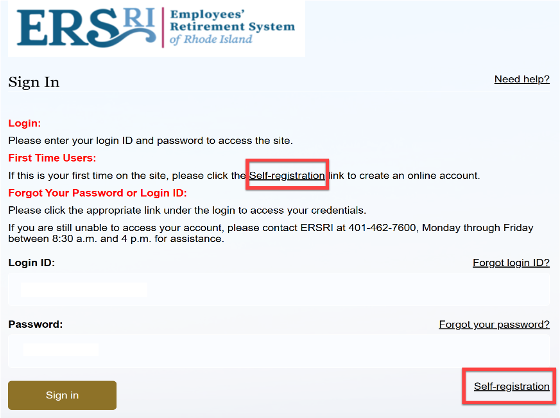
Once you have completed registration, access the portal by clicking on the words Sign In
Enter your user ID (email address you provided) and your password
Note: You will need access to the email account associated to your account in order to provide verification and complete the login process.
Registering the First TIme
All users will need to re-register to access your account. Click the link for self-registration to begin the process.
Municipal Employees’ Retirement System of Rhode Island
Teachers’ Survivor Benefit Trust
Employees’ Retirement System – Teachers
Audited reports for the following schedules:
SMS - Terms & Conditions
By enrolling in ERSRI text message communications, you agree to receive SMS messages related to your account, appointments, service updates, and responses to your inquiries. Message frequency varies; you may receive between 1 and 5 messages per month depending on your interaction with ERSRI services.
You may opt out of SMS communications at any time by replying STOP. After opting out, you will receive a confirmation message and no further texts will be sent. For help, reply HELP or contact our Member Service Front Desk at 401‑462‑7600.
ERSRI does not charge for SMS messages; however, message and data rates may apply depending on your mobile carrier plan.
ERSRI is committed to protecting your information. View our Privacy Policy here: